a51.dphelper.public
dphelper
The supercharged toolkit for modern web development, AI engineering & DevTools.






About
dphelper is a powerful, zero-dependency utility library that brings together 303 production-ready tools for web developers, AI engineers, and DevTools creators.
Think of it as your universal toolbox - from DOM manipulation to cryptographic operations, from real-time WebSocket handling to AI-powered token optimization. No more juggling multiple packages. One import, infinite possibilities.
Why dphelper?
- ⚡ Zero Dependencies - Pure vanilla JavaScript/TypeScript. No bloat, no surprises.
- 🤖 AI-First Design - Built for LLM apps with TOON optimization, token counting, and RAG support.
- 🌐 Universal - Works in browser, Node.js, Bun, and Deno.
- 🔒 Type-Safe - Full TypeScript definitions auto-generated for every tool.
- 📦 Tiny Bundle - Only ~171KB minified, tree-shakeable.
- 🔐 Security First - NIST/NSA compliant, CNSA algorithms, PBKDF2 310k iterations
[!NOTE] Network Access: This library includes networking primitives (
fetch,sse,socket) by design for modern web development. Callers are responsible for validating and sanitizing URLs before use. See the Security section for best practices.
“dphelper is what you’d build if you combined lodash, socket.io, and an AI SDK - but lighter.”
State and Store removed from dpHelper
[!IMPORTANT] dpHelper do not integrate state management directly anymore
Application state is currently handled through Memorio or RGS.
If you need to use state management please consider:
🚀 New Powerful Modules
dphelper has expanded with powerful new modules for modern web development:
✨ Highlights
- 💾 IndexedDB Module: Full-featured wrapper for IndexedDB with query builder, transactions, and bulk operations.
- ⚙️ Web Worker Module: Create and manage workers, worker pools for parallel processing, and SharedWorkers for cross-tab communication.
- 🌍 i18n Module: Complete internationalization with translations, pluralization, date/number formatting, and relative time.
- 🖼️ Image Module: Image processing including resize, crop, filters, rotation, flip, and compositing.
- 🗜️ Compression Module: Gzip, deflate, LZW compression, plus base64, URL, and HTML encoding/decoding.
- 🔐 Biometric Module: WebAuthn support for fingerprint, face recognition, and secure credential management.
⚙️ Web Worker Module
// Create worker from file
const worker = dphelper.worker.create('worker.js', {
  onmessage: (e) => console.log(e.data)
});

// Create inline worker
const inlineWorker = dphelper.worker.createInline(`
  self.onmessage = e => postMessage(e.data * 2);
`);

// Worker pool for parallel processing
const pool = dphelper.worker.pool('worker.js', 4);
const results = await dphelper.worker.poolExec(pool, [1, 2, 3, 4]);

// SharedWorker for cross-tab communication
const shared = dphelper.worker.shared('worker.js', { name: 'my-shared' });
🌍 i18n Module
// Set locale
dphelper.i18n.setLocale('it');

// Add translations
dphelper.i18n.addTranslations('it', {
  hello: 'Ciao {name}!',
  items: '{count, plural, one{# item} other{# items}}'
});

// Translate with interpolation
dphelper.i18n.t('hello', { name: 'World' }); // "Ciao World!"

// Pluralize
dphelper.i18n.pluralize(5, { one: 'item', other: 'items' }); // "items"

// Format number/currency
dphelper.i18n.number(1234.56, 'de-DE', { style: 'currency', currency: 'EUR' });

// Relative time
dphelper.i18n.relativeTime(Date.now() - 3600000); // "1 hour ago"
🖼️ Image Module
// Load image
const img = await dphelper.image.load('photo.jpg');

// Resize
const resized = dphelper.image.resize(img, 100, 100);

// Crop
const cropped = dphelper.image.crop(img, { x: 0, y: 0, width: 50, height: 50 });

// Apply filters
const filtered = dphelper.image.filter(img, { brightness: 1.2, sepia: 0.5 });

// Rotate/Flip
const rotated = dphelper.image.rotate(img, 90);
const flipped = dphelper.image.flip(img, 'horizontal');

// Grayscale/Blur
const gray = dphelper.image.grayscale(img);
const blurred = dphelper.image.blur(img, 5);
🗜️ Compression Module
// Gzip compression
const compressed = await dphelper.compress.gzip('Hello World');
const decompressed = await dphelper.compress.gunzip(compressed);
// Base64 encoding
const encoded = dphelper.compress.base64Encode('Hello');
const decoded = dphelper.compress.base64Decode(encoded);
// URL encoding
const urlEncoded = dphelper.compress.urlEncode('Hello World!');
const urlDecoded = dphelper.compress.urlDecode(urlEncoded);
// HTML encoding
const htmlEncoded = dphelper.compress.htmlEncode('<script>');
const htmlDecoded = dphelper.compress.htmlDecode('<script>');
🔐 Biometric Module (WebAuthn)
// Check availability
const available = dphelper.biometric.isAvailable();

// Get support details
const support = dphelper.biometric.getWebAuthnSupport();

// Register credential
const { success, credentialId } = await dphelper.biometric.register('user123');

// Authenticate
const { success } = await dphelper.biometric.authenticate('user123');

// Check specific sensor
const hasFingerprint = await dphelper.biometric.isSensorAvailable('fingerprint');
Table of Contents
- About
- Installation
- AI Power User Guide
- Modular Architecture
- Browser Extension (Chrome/Edge)
- Environment Compatibility
- Security
Installation
npm i dphelper --save-dev
Usage
Import it precisely once in your entry point (e.g., index.js, main.ts, or App.tsx):
import "dphelper";
// dphelper is now available globally across your entire project!
For plain HTML/CDN:
<script src="https://unpkg.com/dphelper/dphelper.js"></script>

<!-- Optional check -->
<script>
  console.debug(dphelper.version);  // latest version
  console.debud(dphelper.isBrowser); // true
</script>
AI Power User Guide
The new dphelper.ai module is designed for the modern AI stack (LLMs, RAG, Vector Search).
// ⚡ TOON: The ultimate JSON alternative for prompts
const toonData = dphelper.ai.toon(myJsonObject);
// Efficient, compact, and deterministic.

// 📏 Context-Aware Token Counting
const tokens = dphelper.ai.tokenCount(myJsonObject);
// Automatically calculates tokens based on the optimal TOON representation.

// 🧩 Smart Chunker (RAG Ready)
const chunks = dphelper.ai.chunker(longText, { size: 1000, overlap: 200 });

// 🔍 Semantic Similarity
const score = dphelper.ai.similarity(embeddingA, embeddingB);

// 🧠 Reasoning Extractor (DeepSeek/O1 support)
const { reasoning, content } = dphelper.ai.extractReasoning(rawAiReply);

// 📸 The AI Black Box (Snapshot)
const appStateToon = dphelper.ai.snapshot();
// Generates a complete app "mental dump" (URL, gState, Logs) optimized for LLMs.
Modular Architecture
Every tool in dphelper is now a self-contained module. Our new build system automatically:
- Scans the
tools/directory. - Generates dynamic imports for the core.
- Synchronizes TypeScript interfaces in
dphelper.d.ts.
This ensures that adding new tools is instantaneous and always documented with full Intellisense support.
🔄 UI Mirror & Auto-Recovery
dphelper makes your web app feel like a native desktop application with cross-tab intelligence.
// ⚓ Auto-Recovery: Save scroll and input values across reloads/crashes
dphelper.UI.anchorContext();

// 💓 Pulse: Real-time event bus between all open tabs (No Backend needed!)
const bus = dphelper.sync.pulse('my-app', (msg) => {
  console.debug('Received from another tab:', msg);
});
bus.emit({ action: 'theme-change', value: 'dark' });

// 🔒 Interlock: Monitor how many tabs of your app are active
dphelper.browser.interlock((count) => {
  console.debug(`Active tabs: ${count}`);
});

// 🌊 SSE: Modern streaming (Support for POST & Headers)
const stream = dphelper.sse.open('/api/ai', {
  method: 'POST',
  headers: { 'Authorization': 'Bearer ...' },
  body: JSON.stringify({ prompt: 'Hello AI' })
});

stream.on('message', (data) => console.debug('Chunk:', data));
stream.on('error', (err) => console.error('Stream failure:', err));
Browser Extension (Chrome/Edge)
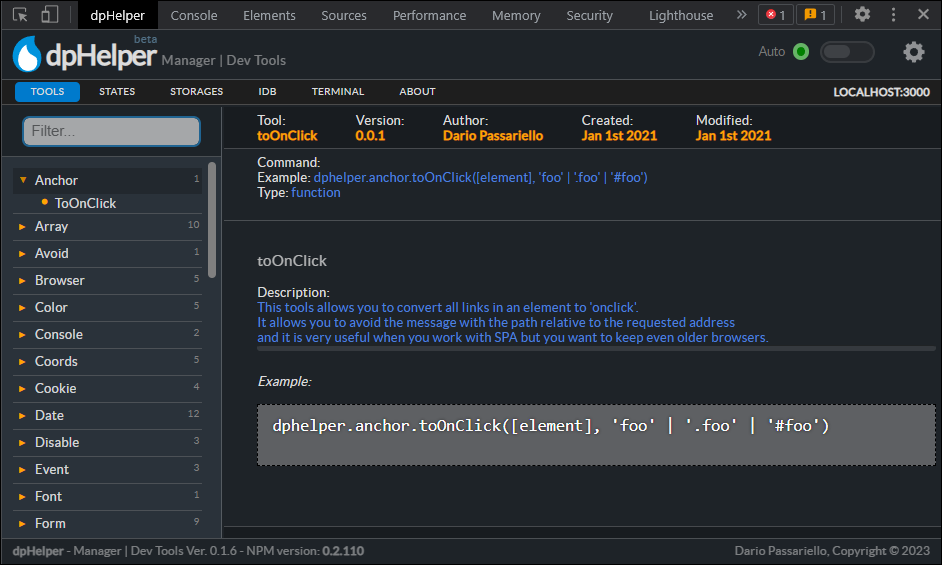
Manage your dphelper environment, monitor memory usage, and access documentation directly from your browser.
Environment Compatibility
dphelper tools are classified by their execution target to ensure stability across the stack.
| Icon | Type | Description |
|---|---|---|
| 🌐 | Client | Browser only (requires DOM, window, or navigator). |
| 🖥️ | Server | Node.js / Bun / Deno only (access to process, fs, etc). |
| 🧬 | Isomorphic | Universal. Works in both Browser and Server (AI, Logic, Math). |
Core Module Status
dphelper.ai: 🧬 Isomorphicdphelper.fetch: 🧬 Isomorphic (Supports Node 18+)dphelper.sse: 🌐 Client (Streaming fetch)dphelper.socket: 🌐 Client (WebSocket)dphelper.sync: 🌐 Client (BroadcastChannel)dphelper.UI: 🌐 Client (DOM based)
Security
dphelper follows NIST SP 800-53 and NSA security standards:
Cryptography (CNSA Compliant)
- AES-256-GCM encryption
- SHA-256 only (SHA-1 deprecated)
- PBKDF2 with 310,000 iterations (OWASP 2023)
Network Security
- HTTPS required for
fetchandSSE - TLS enforced for
socket(wss:// only) - URL validation built-in
[!IMPORTANT] For Library Users: Network functions require input validation by the caller. Always sanitize URLs before passing to dphelper networking tools.
// Correct
const safeUrl = dphelper.sanitize.url(userInput);
await dphelper.fetch.get(safeUrl);

// Never do this
await dphelper.fetch.get(userInput); // ❌ Unvalidated
Compliance
- 100% NIST/NSA compliant
- No known vulnerabilities
- Automated security scanning in CI
License
MIT License
Credits
Copyrigth (c) Dario Passariello